> For the complete documentation index, see [llms.txt](https://primexbt.gitbook.io/help-center/llms.txt). Markdown versions of documentation pages are available by appending `.md` to page URLs; this page is available as [Markdown](https://primexbt.gitbook.io/help-center/covesting/quick-start-for-following.md).
# Quick Start: How to begin Following a Strategy
**Copy-trading Strategy Following** allows you to Follow desired Strategies with your own capital and profit passively from the successful trading activity of Strategy managers.
*(For tips on choosing strategy see our guide '*[*Choosing a Strategy that best suits you. Essential tips*](/help-center/covesting/finding-the-right-strategy-for-you.md)*.')*
To Follow a Strategy, go to the [Copy-trading Strategy Rating](https://primexbt.com/my/covesting/rating) page. Here you will find a list of all active Strategies and their core statistics:
1️⃣ Click on a Strategy to bring up that **Strategy's performance and Following page,** then click 'Follow':
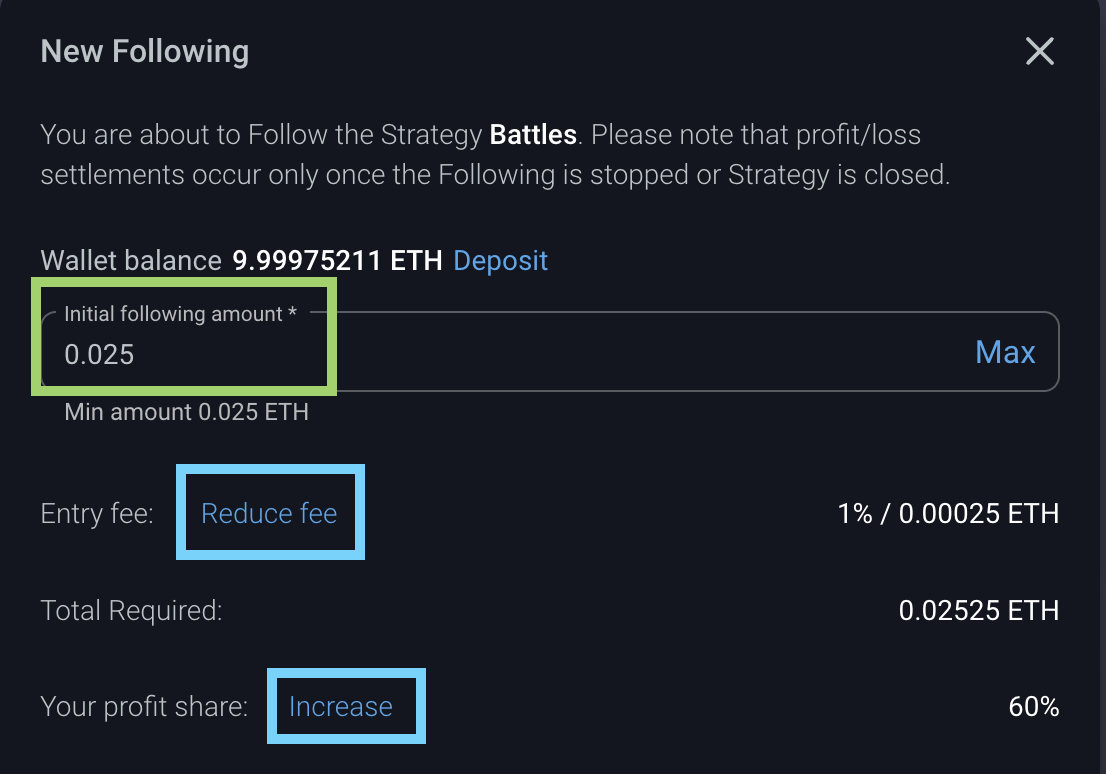
2️⃣ Select the **initial following amount**, and make sure to review the Following's details. Enable any desired **utility** (optional) if you wish. Click 'Follow' to start the Following:
{% hint style="success" %}
Followers can Follow numerous Strategies simultaneously and can also have multiple active Followings in any Strategy.\
\
When Following Strategies, it is important to take into account that a 1% entry fee is incurred whenever a Following is started. Activating a COV Membership via [COV token staking](/help-center/cov/cov-token-utility.md) allows followers to get a **100% discount** on entry fees, as well as increasing profit share in their favour. To activate a membership click on any of the '**Reduce fee**' options (as outlined in the screenshot above).
{% endhint %}
\
All active Followings and Following history are reflected in your '[Portfolio](https://primexbt.com/my/covesting/portfolio)':
To start another Following for the same Strategy or a different Strategy, simply select the desired Strategy and repeat the steps above.\
\
To learn how to manage your Followings, see our '[Managing your Portfolio](/help-center/covesting/managing-a-following.md)' guide.
{% hint style="info" %}
Each separate currency can be used only in **Margin trading accounts, Strategies** and **Followings denominated in the SAME currency.** For example, BTC can be used in Strategies denominated only in BTC, while ETH can be used in Strategies denominated only in ETH.\
\
If you wish to start following a Strategy, make sure to deposit the same currency as the one that the Strategy is denominated in.\
\
Alternatively, using our in-wallet [**Currency Exchange**](/help-center/deposits-withdrawals/currency-exchange.md) feature allows you to exchange BTC, ETH, USDT and USDC amongst each other, directly between your PrimeXBT account Wallets.
{% endhint %}
{% hint style="success" %}
Additionally **Copy-trading Strategy Following** is available in the [Android](https://play.google.com/store/apps/details?id=com.primexbt.trade) or [IOS](https://apps.apple.com/us/app/primexbt-crypto-trading/id1522267195) applications of the platform.
{% endhint %}
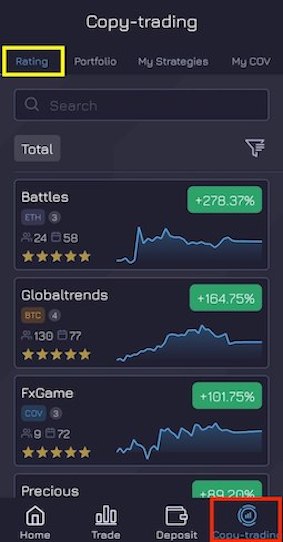
1️⃣ To begin a **Following**, navigate to the '**Copy-trading**' section of the application interface, and select '**Rating**' tab:
In the 'Rating' tab you will find a list of all active Strategies and their core statistics. By clicking on the  button you can adjust the view to see active Strategies by '*Total profit*' or '*Today profit*'.
{% hint style="info" %}
Additionally, you can click on the  (filter) button to search Strategies using various criteria, such as: '*Currency*', '*Total profit*', '*Today\`s profit*', '*Active days*', '*Followers*' and '*Rating*'.
{% endhint %}
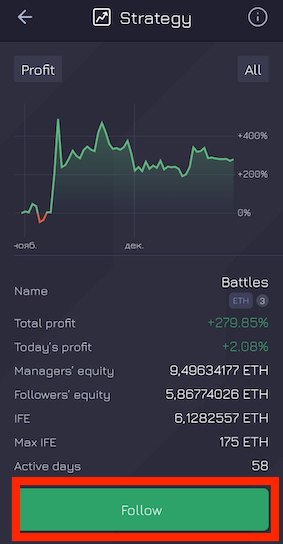
2️⃣ Click on a Strategy to bring up that **Strategy's performance and Following page,** then click 'Follow':
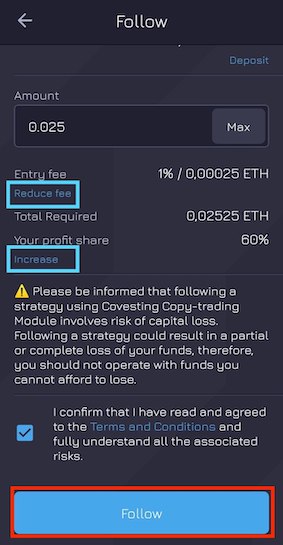
3️⃣ Select the **initial following amount**, and make sure to review the Following's details. Enable any desired [utility](/help-center/cov/cov-token-utility.md#available-utility-options) (optional) if you wish by clicking on any of the '**Reduce fee**' options. Click 'Follow' to start the Following:
{% hint style="info" %}
Followers can Follow numerous Strategies simultaneously and can also have multiple active Followings in any Strategy.\
\
To start another Following for the same Strategy or a different Strategy, simply select the desired Strategy and repeat the steps above.
{% endhint %}
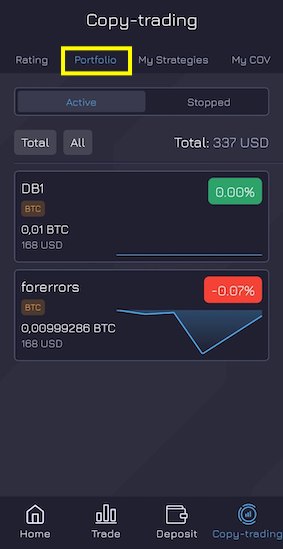
All **active** and **stopped** Followings are reflected in the '**Portfolio**' tab:
Here you can manage and review detailed information about your *active* Followings, as well as review historical data of all *stopped* Following.
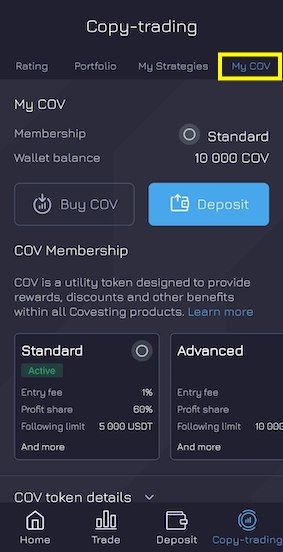
Detailed information about your current [COV Membership](/help-center/cov/cov-token-utility.md#cov-staking) is reflected in the '**My COV**' tab:
Additionally, here you can find corresponding options to ***Buy*** or ***Deposit*** COV tokens to your PrimeXBT Wallet.
{% hint style="success" %}
Make sure to review our detailed article about [COV token staking](/help-center/cov/cov-token-utility.md) which allows followers to get a **100% discount** on entry fees, as well as increasing profit share in their favour.
{% endhint %}